Your first drill should make the projects you actually have easier to control. Before you compare battery numbers or giant accessory kits, write down three jobs you expect to do: assembling furniture, drilling small holes in boards, or installing hardware are useful descriptions.
A cordless drill driver with a variable trigger, an adjustable screwdriving clutch, and a chuck that accepts your intended bits is a sensible starting category. The right individual tool still depends on its manual, your materials, and whether its size feels manageable with the battery installed.
Start with the hole or fastener
Picture a small shelf made from pre-cut lumber: you need accurately placed holes, controlled screw seating, and room to hold the tool square. You probably care more about a comfortable grip and a predictable trigger than winning a contest for the largest torque number.
Now picture repeated large holes in masonry, or long structural fasteners in a building project. Those tasks can call for different tools, accessories, fastening instructions, and training, so do not assume that buying a heavier version of a general drill solves every problem.
A hammer drill adds a percussion mode for compatible masonry work, while an impact driver applies rotational blows for fastening. The names sound similar, but the functions differ; choose by the job instructions rather than the appearance of the tool or a retailer’s broad category label.

Read chuck capacity as a shank limit
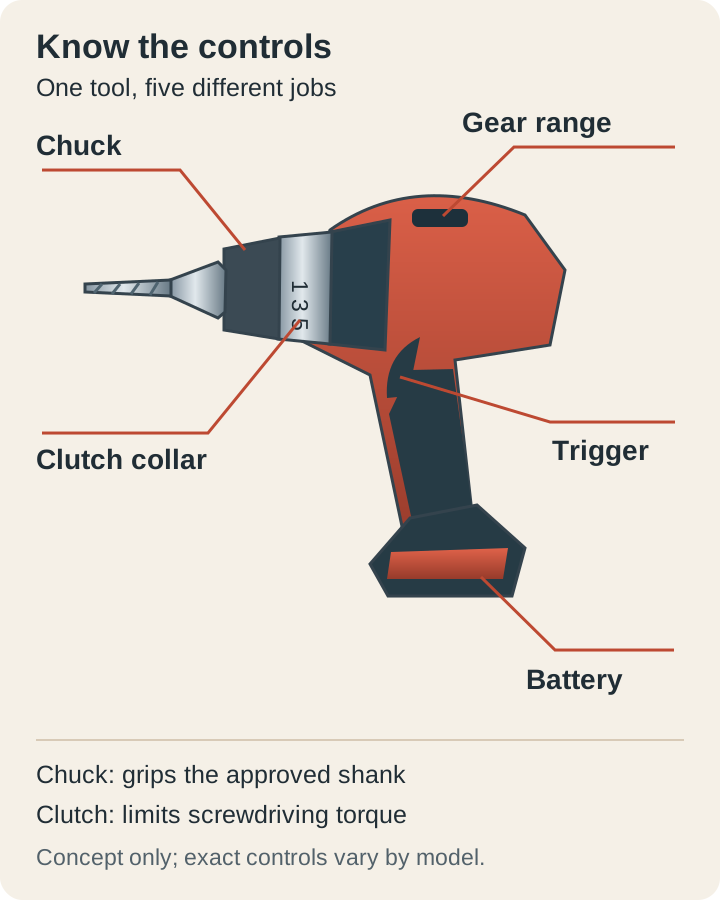
The chuck is the three-jaw holder at the front of a conventional drill. Its stated capacity describes the shank it can grip, so a half-inch chuck does not promise that you can drill every half-inch hole in every material.
Check both ends of the capacity range when you expect to use tiny bits, and compare the tool’s separate drilling limits for wood, metal, and each accessory type. A large cutting head can have a reduced shank, which makes physical fit different from approval for the task.
Before you buy, look at the bits your project requires and read the shank measurements on their packaging. Treat extensions and adapters as additional compatibility checks, because making something fit does not establish that the tool can safely turn it under load.
With the battery removed, inspect how the chuck opens, closes, and holds an accessory according to the manual. You want the shank centered between the jaws, rather than trapped beside one jaw or clamped on a cutting flute.
Use the clutch as a starting adjustment
The numbered collar helps limit screwdriving torque on drills equipped with an adjustable clutch. Bosch’s drill guidance distinguishes that adjustment from drilling mode; the useful number is the one that suits your actual joint, rather than a universal setting you can copy between brands.
For a practice joint, use offcuts of the same material and the same screw as the real project. Start with a low setting, drive slowly, and increase only as needed until you can seat the fastener without crushing the surface or continuing after the intended stopping point.
You still need to release the trigger when the screw reaches its correct position. A clutch does not inspect your joint, recognize a fragile finish, or turn an ordinary drill into a calibrated torque tool for a manufacturer-specified assembly.
The drill-bit symbol often changes or bypasses clutch behavior, but you must confirm what it does on your exact model. Do not switch to it merely because a screw is resisting; pause to check the pilot hole, drive fit, screw length, and material first.
Separate gear choice from trigger control
A two-speed gearbox provides different operating ranges, and the trigger lets you vary speed within the selected range. Bosch describes lower-speed gearing for screwdriving and higher-speed gearing for suitable drilling, but your bit diameter and material still determine the appropriate operating speed.
Think of the gear switch as choosing the range before you begin, then use a gentle trigger movement to start accurately. Check the manual for when and how you may shift; do not force a reluctant selector or change settings while the mechanism is moving unless expressly permitted.
Try the trigger without cutting anything only as the manual allows, then practice on secured scrap with the accessory touching the work as instructed. You are looking for a smooth start that you can repeat, not simply the loudest or fastest response.
Buy a battery arrangement you can live with
Battery compatibility depends on the named system and the exact approved battery and charger combinations. Matching voltage labels alone is insufficient, so check the compatibility list instead of assuming that packs from the same brand, color, or advertised voltage will interchange.
Amp-hours describe charge capacity, but you cannot turn that number into a guaranteed count of holes without knowing the tool, battery condition, accessory, material, and workload. For occasional home jobs, a pack that keeps the tool comfortable may be more useful than a larger pack chosen only for its label.
Compare the complete purchase: tool, battery, charger, and any second pack you genuinely need. A low bare-tool price can be misleading when you are starting from nothing, while a kit may include extras that add cost without helping your first projects.
Find a dry storage and charging location that follows the battery instructions before you bring the kit home. Keep exposed terminals away from loose metal, use the approved charger, and retire a damaged pack through the manufacturer’s recommended process rather than attempting a home repair.
Check whether replacement packs and chargers are sold separately in the system you are considering, and include those options in your notes. You are making a useful ownership decision when you understand how to replace a worn component without automatically buying a whole new drill kit.
Check fit with a realistic working position
Hold a demonstration tool with its intended battery installed and imagine drilling into a board at waist height. Notice whether you can reach the trigger comfortably while keeping your wrist aligned, and whether the front of the tool blocks the place where you need to see the mark.
Then imagine working inside a cabinet, where tool length and bit length compete for the same space. A compact body can help, but verify the full assembled reach instead of comparing body dimensions that exclude the chuck, accessory, or battery.
Useful conveniences include readable markings, accessible direction controls, and a light that illuminates your actual work area. Treat them as practical details to evaluate, because a long feature list does not tell you whether a tool is pleasant to hold for your particular task.
Walk through a small shopping decision
Suppose your list contains a flat-pack cabinet, a wooden planter, and replacement drawer pulls. First confirm the assembly instructions and materials, then shortlist manageable drill drivers whose capacity and accessories cover the required holes and fasteners.
Next compare two complete kits on paper, including replacement battery availability and the size of the packs you would actually use. If one system costs more but its compact tool fits your cabinet work comfortably, that can matter more than an unused high-torque specification.
Leave room in your budget for correctly sized bits, a manual screwdriver, appropriate eye protection, and workholding. Those basics influence the quality of a small project immediately, while an oversized assortment of unfamiliar attachments can wait until a real job calls for them.
Give your first session a clear finish line
Read the exact manual, identify every control with power disconnected, and set up a simple scrap exercise with no hidden wires or pipes. Practice one straight hole and one correctly seated screw, changing only one setting at a time so you can tell what produced the result.
Stop if the bit binds, the accessory slips, the work moves, or you cannot keep a stable stance. Your successful first drill is the one you understand well enough to use within its limits, with a small repeatable task you can finish calmly.