A screw is easier to drive when you identify two different things: the shape of its head and the shape of the recess that accepts your bit. Calling everything a “flat head” hides that distinction and can send you searching for the wrong tool.
Before you touch the trigger, cleanly identify the drive, choose the correct size, and check how the tip seats by hand. A few seconds of inspection can preserve the recess that you will need again when the project eventually comes apart.
Separate head shape from drive shape
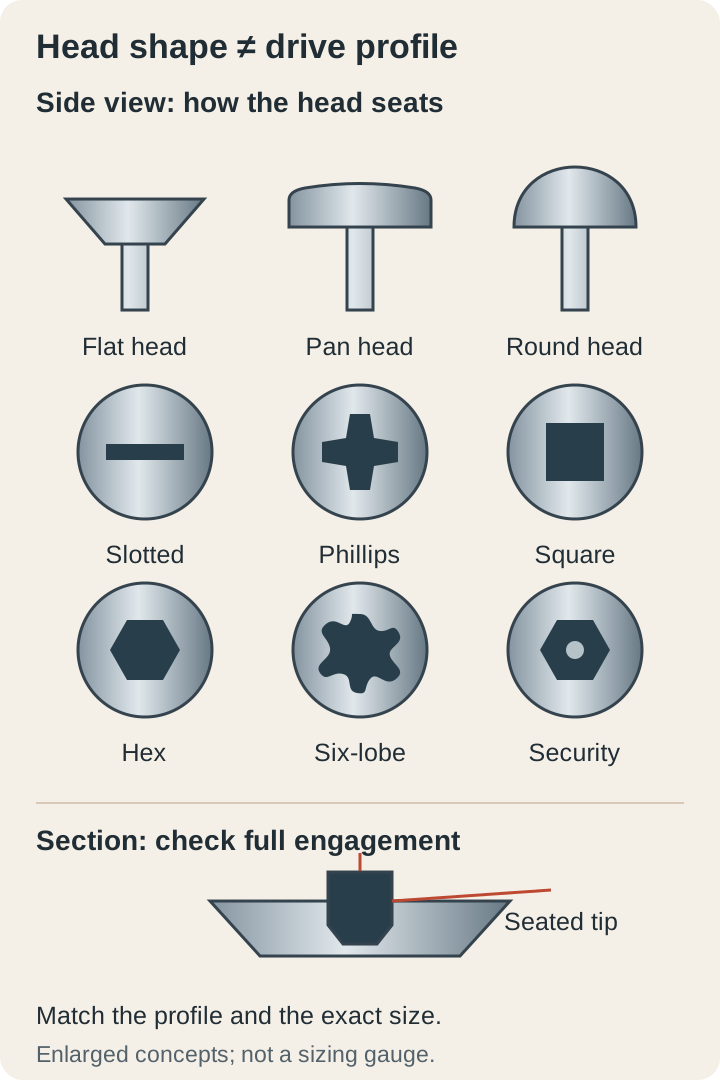
A flat-head screw usually has a tapered underside intended to sit in a matching countersink. Pan heads, round heads, and other bearing shapes seat differently, so you should match the screw to the hardware or joint instead of forcing every head below the surface.
The drive is the slot, cross, square, hexagon, star-shaped recess, or another feature that receives torque from the tool. A tapered flat head can have several different drives, which is why “flat-head screw” does not automatically mean “use a slotted screwdriver.”
Describe both when you shop for a replacement, along with the thread, length, material, and intended application. Matching the visible drive alone does not make two screws interchangeable, especially when you are replacing hardware that carries a load or belongs to a specified assembly.
Recognize the common profiles without guessing
A slotted drive has one straight opening, while a Phillips drive uses a cross-shaped recess and a matching numbered tip. Square drives and internal hex drives need their own sizes, and a six-lobe star-shaped drive needs the specified compatible tip rather than a similar-looking substitute.
Phillips and Pozidriv deserve special attention because they can look alike at first glance. Look for the manufacturer’s drive designation and identifying markings, then use the matching system; a bit that seems to turn the screw briefly may still contact it poorly.
Security versions can add a center pin or another feature that changes the required accessory. Stop and identify that feature rather than breaking it out, grinding the tip, or assuming that every unusual recess is simply a damaged ordinary screw.
A phone photo with good lighting can help you compare the recess with the assembly instructions before buying a bit. Keep that photo as identification support, but verify fit on the actual screw because perspective and dirt can hide small differences in a close-up image.
Treat size as part of the drive name
A Phillips number is a tip size, not the screw’s length, and it is not a universal description of the screw’s thread diameter. Choose the specified size or compare suitable tips carefully by hand instead of assuming that one common bit covers every cross-shaped recess in your home.
For slotted fasteners, both blade width and blade thickness affect how the tip engages. Wiha’s size guide lists multiple dimensions and metric-to-inch equivalents, which is a useful reminder that “small flat screwdriver” is too vague when you are trying to preserve a particular slot.
Metric and inch hex sizes can be close enough to tempt you into using the wrong one. Keep them identified and choose the exact specified dimension, because a small amount of looseness can turn into damaged corners when torque rises.
When a replacement part arrives with its own screws, keep them with that part until assembly is complete. Combining them immediately with your general hardware bin can remove the only easy connection between an unfamiliar drive, its supplied tool, and the instructions that explain how it should be installed.
Do the fit check with power off
Set the correct-looking tip into the clean recess and look for full engagement before applying power. If it sits high, rocks conspicuously, or only catches at the edges, investigate whether debris, the wrong profile, the wrong size, or existing damage is preventing proper contact.
Compare a fresh matching bit when you are uncertain about wear. A rounded or chipped tip may look familiar enough to keep using, but repeatedly testing it under power risks sacrificing the screw while you try to diagnose the accessory.
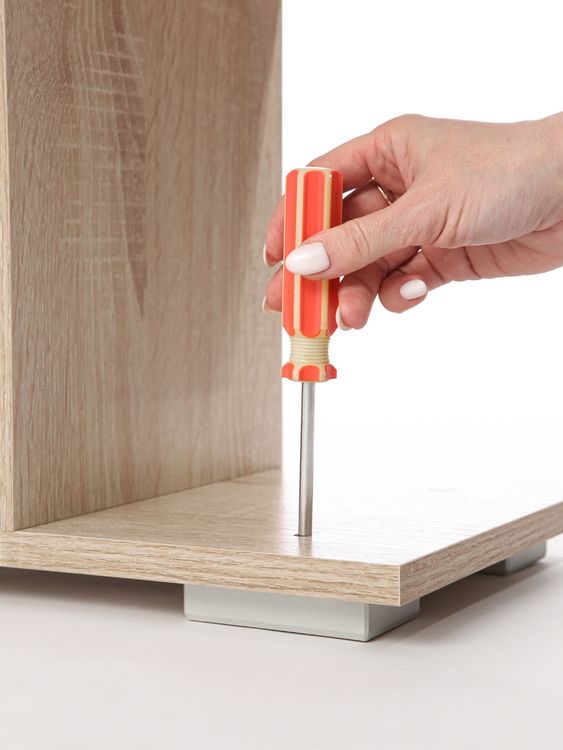
Keep the driver axis aligned with the screw axis and arrange enough access for the handle or tool body. If a cabinet side forces you to approach at an angle, change your access arrangement or use an appropriate designed tool instead of pretending a tilted bit is seated correctly.
Prepare the joint before blaming the bit
Lay out the parts and confirm that the screw belongs in that location. A fastener that bottoms out in a shallow hole, catches an obstruction, or tries to pull misaligned parts together can resist even when your drive and tip match perfectly.
In a wood joint, use the pilot, clearance hole, and head recess required for the screw and material. Those features are separate from drive selection, so a premium bit will not fix a hole that prevents the screw from doing its intended job.
For machine screws entering existing threads, start by hand as the assembly instructions direct. If the screw does not begin smoothly, back it out and inspect rather than letting a power tool decide whether the threads should fit.
Use power as controlled assistance
For suitable light fastening, a drill driver with an adjustable clutch gives you a way to approach the final seat gradually. Begin with a conservative setting on matching scrap where practical, and remember that the number is specific to the tool and joint rather than a transferable torque value.
Start slowly enough that you can see whether the screw is tracking correctly and the parts remain aligned. As it approaches the intended position, release the trigger and inspect; use a manual finish when that gives you better control and the assembly permits it.
An impact driver may suit demanding compatible fastening, but its extra driving capability does not repair poor engagement. Use appropriately rated accessories and the exact tool’s modes, and do not assume that a series of impacts means a critical fastener has reached a specified final torque.
Stop at the first clear warning
If the bit climbs out of the recess, makes a sudden grinding sound, or begins polishing the drive edges, stop rather than repeatedly squeezing the trigger. The first slip is useful feedback; continuing the same action can erase the remaining shape that a correct bit might still engage.
Remove power before inspecting or changing accessories, then check the bit and recess under good light. If the head is already damaged, move to a deliberate removal plan instead of treating every failed attempt as a reason to push harder.
A screw that turns without tightening presents a different problem from a stripped drive. The recess may still be intact while the receiving material or threads no longer hold, so inspect the whole connection and choose the appropriate repair for that assembly.
Save a damaged screw as a labeled example if it helps you recognize the warning next time, but keep it outside your usable hardware collection. A rounded recess can appear serviceable until the next removal, when it may be hidden in a much less accessible location.
Build a small reference set you understand
Keep a few labeled sample screws beside their matching bits in your workshop notes or a divided tray. Photograph the correct pairing and write the drive designation, then use those samples to practice identification before you encounter an awkward screw inside finished furniture.
Try the exercise without power first: identify the head, identify the drive, identify the size, and describe where the head is intended to seat. That sequence makes your reasoning visible and exposes a missing detail before you risk damaging anything.
Replace worn working tips promptly and keep unidentified fasteners separate from verified replacements. Your goal is a repeatable match between screw, accessory, tool, and joint, with enough control to stop while the head is still in good condition.